Items filtered by date: October 2026
BM Nice Slideshow Res For K2

- Module BM Nice Slideshow Res For K2 is a powerful responsive slideshow.
- The module support 22 nice effects for change images.
- This is a dynamic slideshow with many params to config, you can control everything on your slideshow.
- Slideshow support responsive, so it display nice on all devices size( desktop, laptop, mobile, tablet..).
- You can config color text, icon font, title, loader..
- This module use icon font awesome, it use for icons, buttons(next, preview, pause, play, paging).
- You can control how description appear with 9 effects.
- You can see Userguide of module here.
Configs For Module:
CONFIG COMMON (Data)
- Category: Selects Articles from one or more Categories. If no selection will show all categories as default
- Show subcategory's items: Show subcategory's items of categories were selected
- Count: The number of Articles to display (the default is 5)
- Featured Articles: Show/Hide Articles designated as Featured4
- Order: Recently Added First: order the articles using their creation date. Recently Modified First: order the articles using their modification date. Recently Published First: order the articles using their publication date. Recently Touched First: order the articles using their modification or creation dates.
- Authors: Filter by author.
CONFIG DISPLAY & EFFECTS
- Image's width: Put image's width.
- Image's height: Put image's height.
- Thumb's width: Put thumb's width, use for thumbs on paging
- Thumb's height: Put thumb's width, use for thumbs on paging
- Select Resize Type: Select a Type to Resize Images (6 types, you can use ORIGINAL IMAGE type if want to show image not resized).
- Get Images From: Where do you to get a image from an article (Full article image, Intro Image or Intro Text).
- Auto Play: Auto play or not
- Auto play mobile: Auto play for mobile size
- progess bar position: Where you want progess bar display
- Progess bar direction: Select progess bar direction
- Effects: Select one or random effect for slideshow
- Columns effect: Number of columns will be processed
- Rows effect: Number of rows will be processed
- Easing effect: Easing for effect
- Description effect: Select how descripiton appear
- Stop Hover: Stop when hover
- Loader type: Select type for loader (bar, pie or none)
- Loader color: Choose color for loader
- Loader bg color: Loader background color
- Icon Font Color: Select color for icon font. color for next, preview, pause & play button, color for buttons of paging too
- Loader Opacity: Loader Opacity has value from 0 to 1, Eg: 0.1, 0.2 ... 1
- Loader padding: Change size of loader when use this param, bigger loader with bigger value
- Loader stroke: The thickness both of the pie loader and of the bar loader. Remember: for the pie, the loader thickness must be less than a half of the pie diameter
- Show Navigation: Yes or No, to display or not the navigation buttons
- Naviagtion Hover: Display Navigation when hover
- Mobile Naviagtion Hover: Display Mobile Navigation when hover
- Show Pagination: Yes or No, to display or not the pagination
- Play & Pause button: Yes or No, to display or not the play/pause buttons
- Pause on click: Pause slideshow when click
- Pie diameter: Width for loader has type is pie
- Pie Position: Select position for pie in slideshow
- SlideOn: next, prev, random: decide if the transition effect will be applied to the current (prev) or the next slide
- Show Thumbnails: Show Thumbnails when hover pagination
- Timer: milliseconds between the end of the sliding effect and the start of the nex one
- Transperiod: lenght of the sliding effect in milliseconds
CONFIG SHOW DATA
- Link color: Config color for link, you can also leave it blank it will display follow color of website
- Text color: Config color for tex, you can also leave it blank it will display follow color of website
- Show description box: Yes/No
- Title limit: Character number for title
- Readmore Limit: Character number for introtext, if you want show full introtext you can set is -1
- Show title: Turn on & off title
- Add link title: Add link title (Y/N)
- Select H tag for title: Tag for title
- Show info box: Info box contain: Author, Category, Publish, Hits
- Show author: Show author(Y/N).
- Show category: Show category (Y/N).
- Show publish: Show publish date (Y/N).
- Show hits: Show hits time (Y/N).
- Show description: Show description (Y/N).
- Show readmore: Show readmore button (Y/N).
- Kept Html: Kept html for description (Y/N)
- Show readmore: Show readmore button (Y/N)
- Readmore label: Change Readmore label here
- Description top: Margin top for Description. Value can be is 'px,%', eg: 100px or 40%, you can also leave it blank
- Description bottom: Margin bottom for Description. Value can be is 'px,%', eg: 100px or 40%, you can also leave it blank
- Description left: Margin left for Description. Value can be is 'px,%', eg: 100px or 40%, you can also leave it blank
- Description right: Margin right for Description. Value can be is 'px,%', eg: 100px or 40%, you can also leave it blank
- Description width: Width for Description. Value can be is 'px,%', eg: 100px or 40%
- Description height: Height for Description. Value can be is 'px,%', eg: 100px or 40%
- Load Jquery: Load Jquery If your website doesn't has Jquery file
Another our modules for K2:
BM Slideshow Pro For K2 (New)
BM Moon Slider For K2
BM Gird Slider For K2
BM Tab For K2
BM Sweet Slider For K2
BM Slider For K2
BM Flip Master For K2
BM Smooth Slideshow For K2
BM Accordion for K2
BM Top For K2
Easy Google Maps Plugin for K2

Features:
- Latitude & Longitude
- Zoom, Maximum Zoom, Minimum Zoom
- Localization
- Maptype (RoadMap, Satellite, Hybrid, Terrain)
- Custom Markers
Dropfiles Joomla file manager

Dropfiles, the easiest and powerful files manager for Joomla. The AJAX interface save you a lot of time and allows you to manage a massive amount of files. Now it comes with a Google Drive integration.
No more need to go in a component and go back in a menu or in an article to manage files. You just need to create a category of file, drag and drop files, then insert your file or category in your editor. Upload and display as many files as you want in only 3 clicks.
You can also apply advanced file restriction access for file administrator and for end users. Native Joomla access level can be applied in one click on each file category and you can set authorized action for file administrator. Dropfiles works the same for backend and frontend. Perfect to work fast to all type of user.
Check the video demo here: https://vimeo.com/67114053
The Google Drive integration brings a two way sync system, you can add and sync files from Dropfiles or from Google Drive. An import file tool is also available to take back files from other component or server folder.
** Administration main features **
- K2 dedicated integration: manage categories of files and single files from K2 item main editor. no need to load a third party component.
- Upload and display files in 3 click
- Manage files, categories, file options, themes from the text editor (no need to go in the component)
- File and categories are automatically opened on editor button click
- Apply one of the 4 theme per category
- Set category level and ordering using drag'n drop
- Category accordion and compact interface to manage numerous files
- File import from any other component or server folder
- Order files with drag'n drop
- Possibility to restrict file display / category per Joomla user
- Possibility to copy or move files (copy/cut/paste) from one categories to another with drag'n drop
- Advanced ordering tool: order file by type, title, description, file size, date, version, hits
- Advanced ACL for file administrators by action (create, update files, manage own files,...)
- Column AJAX filtering in file listing
- Send custom Email notification on action: file upload, file modification, file download, file remove
- Define the display information in theme
- HTML5 fast uploader
- Create a theme easily, just duplicate a folder
- jQuery compatibility parameters
- Download and upload files from mobile devices
- Backend mobile support
- Add a remote download file (file stored on an external server)
** Frontend main features **
- Frontend file management with dedicated template
- Manage all files in the same way as in the backend
- 4 responsive themes with icons set
- Native Joomla ACL on files categories in one click
- Google previewer tool integrated
- Video and sound player
- SEO optimization with file rename and prefix option
- Visual customization of each theme
- File search engine with plein text
- File seach and filtering by categories, tags or dates
- Define ACL on file action (edit file, edit own files, delete files...) per joomla user groups
** Google Drive integration **
- Connect with your Google Drive account
- Insert and manage Google Drive category of files
- Files are uploaded in a dedicated folder and sub folder on your Drive
- Upload files on Google Drive website folder and push the files on your Joomla website!
- Title, version, description are also sync
- Preview and download of native Google documents
** Dropbox integration (included) **
- Connect with your Dropbox account
- Insert and manage Dropbox category of files
- Files are uploaded in a dedicated folder and sub-folders on your Dropbox
- Upload files on Dropbox website folder and push the files on your Joomla website!
- Title, version, description are also sync
BM Slider For K2
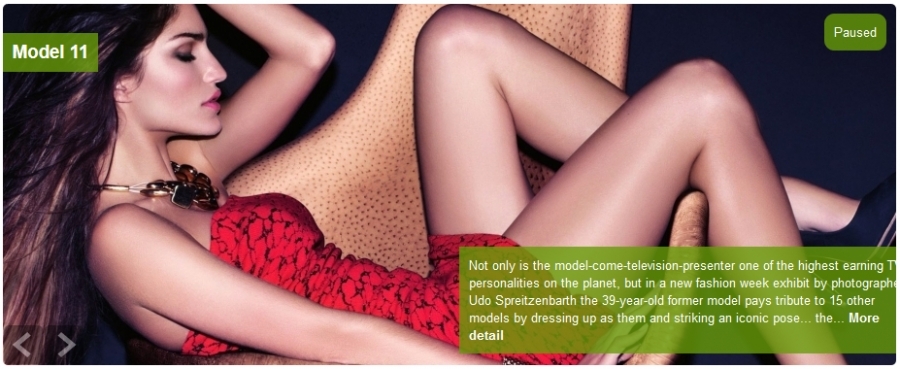
Support Responsive Feature, The slider (slideshow) can auto resize when display on other devices (Display nice on desktop, laptop, tablet, mobile).
This Module has 2 themes (Default and Theme1).
If you want a slideshow or a slider for your website, you are seeing it.
What are you waiting for, get it and love it.
The Module support:
* This is a Module for joomla 2.5 and 3.x
* Retrieve items from categories or Select specific items
* Image size : XSmall, Small, Medium, Large, XLarge
* Image's link: Link for image or not
* Select Themes: 2 themes, default and theme1
* Image's width & Image's width config
* Select Resize Type: Scale fill, Scale Inside, Scale Outside, Crop, Crop Resize
* Title limit: Limit text for title
* Readmore Limit: Limit text for description
* Show description or not
* Show readmore or not
* Readmore label: Label for readmore link
* Timeout: Time between each slide
* Visible items: number items, images show on first page - use for theme1
* Item start: Start item for slider
* Select effect: scrollHorz, fade, fadeout, carousel(use for theme1), none
* Hover: Stop when hover or not
* Responsive: you want slider auto resize please select 'Yes'
* Swipe: Yes or No
* Show paging: Yes or No.
* Load Jquery: Yes or No.
Another our modules for K2:
BM Slideshow Pro For K2 (New)
BM Gird Slider For K2
BM Sweet Slider For K2
BM Tab For K2
BM Moon Slider For K2
Display Unpublished Items In Frontend
It is a copy of the actual mod_k2_content module but it only displays the content that is not published. Next to each title there is an edit link where you can edit the content and publish it.
Emerald Membership

Emerald is one of the oldest Joomla membership extension with tons of features. Simple to manage but very flexible to configure for almost any subscription scenario. It has unique protection algorithm that can work with any extension without need of integration. But we made special fine tune K2 rule adapter to make it more pleasant to create restrictions.
Emerald integration contains 2 elements.
Action
Custom K2 action allows move user to/out K2 user group on success/expire subscription.
Rule
Rule fine tune adapter, allows:
1. Restrict access to article by categories
2. Set if article intro in category view is visible
3. Restrict comments by categories and hide comments form with replaced restriction text
4. Restrict attachment downloads and add lock icon to files to indicate protection
Auto Unpublisher
Amazing Mosaic for K2

4 themes and many parameters are available to customize this module. This gallery is also usable on mobile, tablet and computer.
Responsive Slider for K2
This extension allows you to create a responsive slider touch enabled using as source K2 items with all the options of K2 Content module.
B2J Calendar

This module uses K2 items to display events on calendar. It is fully responsive, with an awesome design. Note, that module can use AJAX mode to load items via AJAX.
B2J Calendar is:
- Compatible with Joomla 2.5/3
- Fully responsive
- SEO friendly
- Easy-to-customize
- Available on any browser
Keep your users informed about your events with B2J Calendar!
Get it now, totally free and get started instantly!
And if you have encountered any problems with B2J Calendar, feel free to ask your questions on B2J Forum.
Categories
Recently Updated
- 17 Sep 2026 RAXO Related K2 Items
- 17 Sep 2026 RAXO All-mode K2
- 02 Nov 2021 RAXO Insert Position
- 12 Oct 2021 4SEO all-in-one SEO extension
- 26 Mar 2021 Econa