The 'de facto' content solution for Joomla professionals!
Items filtered by date: October 2026
Monday, 11 February 2013 14:34
Multi Level Reject, Approval & Notify by Email for K2

When i look at K2 forum and another forums, i always saw people talking about K2 approval process, so I decided to develop one extension to help people. This plugin works in the front end and back-end and for 3 different user groups:
1. Users that can submit items and can't publish.
2. Users that can manage items and can't publish.
3. Admin that have full access on item publishing.
So with this three step admin not need to check for spelling and grammatical error because manager do this kind of staff and admin just publish item.
Notification : when user is in admin group and select reject, plugin load list of managers in drop-down and if user is manager an chose reject, plugin load list of authors. Also if reject select, article automatically will be unpublished.
1. Users that can submit items and can't publish.
2. Users that can manage items and can't publish.
3. Admin that have full access on item publishing.
- if user submit item in front end, this plugin can send notification to email that defined in admin section of plugin.
- if user try to open submitted article in back-end, there is an option to approve or reject this article and notify to article submitter by comment.
- if approve select, plugin change ownership of selected item to selected admin and send email to notify.
- if reject select, plugin send email notify to one of authors that selected from drop-down.
So with this three step admin not need to check for spelling and grammatical error because manager do this kind of staff and admin just publish item.
Notification : when user is in admin group and select reject, plugin load list of managers in drop-down and if user is manager an chose reject, plugin load list of authors. Also if reject select, article automatically will be unpublished.
Published in
Extensions
Monday, 11 February 2013 14:12
K2 v2.6.5 released
The just released v2.6.5 fixes a couple of nasty bugs found in K2 v2.6.4 which was released last week. These bugs were only spotted when using the new advanced SEF options and the new tag normalization option introduced in v2.6.4.
Published in
Blog
Saturday, 09 February 2013 21:01
K2 fan poster

Late in the 80s and early 90s, posters of rock stars or pop idols were decorating every teenager's room.
In 2013, K2 lovers and geeks get theirs!
Kudos to Theodore Vorillas (via Pinterest).
In 2013, K2 lovers and geeks get theirs!
Kudos to Theodore Vorillas (via Pinterest).
Published in
Blog
Thursday, 07 February 2013 18:24
K2 v2.6.4 release - introduces new/cool/SEF/URL options :)
Although not even 10 days have passed since we released K2 v2.6.3, we decided it would be a shame not to release this new version 2.6.4 ASAP. You see, this new release brings some SEF URL enhancements which we know many K2 users will love. To quickly sum things up we have added the new K2 advanced SEF options, tag normalization options, jQuery 1.8.3 and 1.9.1, improved the transliteration logic introduced in v2.6.3 and removed 2 obsolete online image editors (used via the backend).
Published in
Blog
Thursday, 07 February 2013 15:51
Content Slider
Content Slider is a joomla module which help you to create a responsive slider. An awesome, fully responsive jQuery slider toolkit.
- Simple, semantic markup.
- Supported in all major browsers.
- Horizontal/vertical slide and fade animations.
- Multiple slider support, Callback API, and more.
- Hardware accelerated touch swipe support.
- Compatible with the latest version of jQuery
- Support Article, K2 content, Local Folders, PhocaGallery, JoomGallery, Virtuemart.
Published in
Extensions
Tuesday, 05 February 2013 13:35
Multiple Extra Fields Groups (MEFG)
This is a very useful K2 plugin, which enables administrators of websites powered by Joomla and K2 to assign more than one K2 extra fields group to a K2 category.
Install this plugin to save time and complexity, you will not need to refactor your extra fields groups.
The plugin is integrated smoothly with K2 forms for categories and items, no need for extra forms or components.
First, edit the category to assign extra fields groups as required, you will select the main extra fields group as normal, then at the bottom of the category edit form, you can assign more extra fields groups. Then, you will find all the extra fields, belongs to the assigned groups, in the extra fields tab of the item edit form.
Group fields can be displayed in Accordion, Horizontal or Flat layout, this can be configured in the plugin parameters
In addition to the above, the plugin can render mutliselect fields as checkboxes, on both frontend and backend.
Install this plugin to save time and complexity, you will not need to refactor your extra fields groups.
The plugin is integrated smoothly with K2 forms for categories and items, no need for extra forms or components.
First, edit the category to assign extra fields groups as required, you will select the main extra fields group as normal, then at the bottom of the category edit form, you can assign more extra fields groups. Then, you will find all the extra fields, belongs to the assigned groups, in the extra fields tab of the item edit form.
Group fields can be displayed in Accordion, Horizontal or Flat layout, this can be configured in the plugin parameters
In addition to the above, the plugin can render mutliselect fields as checkboxes, on both frontend and backend.
Published in
Extensions
Sunday, 03 February 2013 11:18
Content Showcase - Pinterest Style

This module allows you to present content in Pinterest style. Supports Joomla! Articles & K2 content.
Published in
Extensions
Wednesday, 30 January 2013 21:49
K2 v2.6.3 released - new performance improvements
K2 version 2.6.3 is now available to download or update, bringing a slight speed boost as well. To quickly sum things up, aside the performance improvements, we're adding jQuery 1.9 support, better transliteration for Joomla! 2.5 & 3.0, Joom!Fish 2.5 compatibity and some SEF router improvements.
Published in
Blog
Monday, 28 January 2013 04:18
SJ K2 Splash
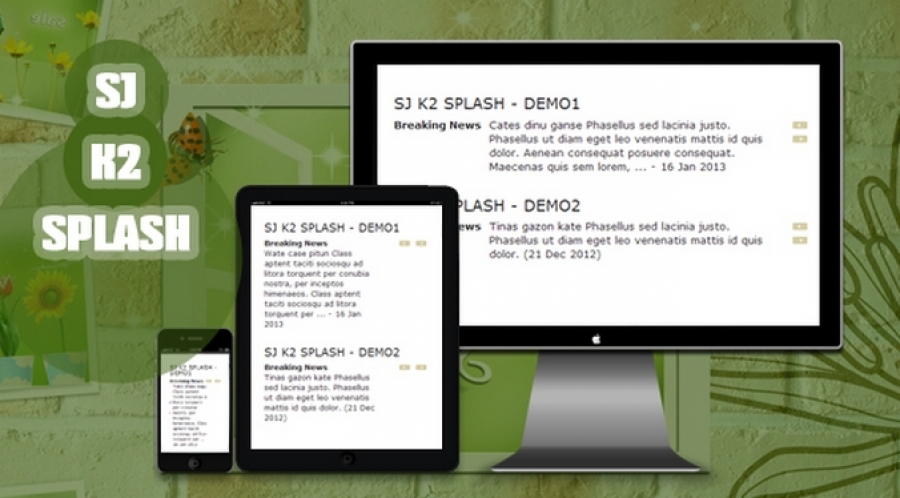
SJ K2 Splash - a free Joomla! module, for showing headlines, breaking news, most read items.... from items of K2 component is officially published. It is not only responsive module but also being with cleanliness and minimalist in design, to be flexibly placed on your K2 pages.
There are two effects for sliding items: horizontal and vertical. Also, there are options to enable the module title and navigation buttons. All can be tweaked in admin panel quickly and easily.
Let download to use, it is free!
# Main Features 1. Made for K2 component 2. Fully compatible with IE8+, Firefox 2+, Flock 0.7+, Netscape, Safari, Opera 9.5 and Chrome 3. Allow to choose which source to be shown, OR set items manually 4. Support order by many criteria: date, title, random... 5. Allow to show only items with media and items featured 6. Allow to 2 effects for two directions 7. Support Multi-Module on the same page 8. Allow to set module title 9. Allow to set total items handled by module 10. Allow to set speed and interval for sliding 11. Allow to set opened links in: New Window, Same Window or Popup 12. Allow to change max length of title and description 13. Support Multi-Language 14. Support 4 modes for resizing images 15. Support caching to make your website load faster 16. Support SEO, pre- and post- text with each instance
List templates are using:
There are two effects for sliding items: horizontal and vertical. Also, there are options to enable the module title and navigation buttons. All can be tweaked in admin panel quickly and easily.
Let download to use, it is free!
# Main Features 1. Made for K2 component 2. Fully compatible with IE8+, Firefox 2+, Flock 0.7+, Netscape, Safari, Opera 9.5 and Chrome 3. Allow to choose which source to be shown, OR set items manually 4. Support order by many criteria: date, title, random... 5. Allow to show only items with media and items featured 6. Allow to 2 effects for two directions 7. Support Multi-Module on the same page 8. Allow to set module title 9. Allow to set total items handled by module 10. Allow to set speed and interval for sliding 11. Allow to set opened links in: New Window, Same Window or Popup 12. Allow to change max length of title and description 13. Support Multi-Language 14. Support 4 modes for resizing images 15. Support caching to make your website load faster 16. Support SEO, pre- and post- text with each instance
List templates are using:
- SJ Vinda
- SJ Snap
- SJ Teen
- SJ Magazine
- SJ WorldNews
Published in
Extensions
Saturday, 19 January 2013 11:44
Extra field image type as link
If you have an image type extra field and need to display a link directly to the image you must strip the default code that K2 uses to insert the image into it's foreach loop. You can insert this directly into your item.php override file.
<?php
$var = $this->item->extraFields->Image->value ;
$var = preg_replace('/<img src="/',"",$var);
$var = preg_replace('/" alt="Image" \>/'," ",$var);
echo '<a href="' . $var . "TextOfLink" . "</a>" ;
?>
<?php
$var = $this->item->extraFields->Image->value ;
$var = preg_replace('/<img src="/',"",$var);
$var = preg_replace('/" alt="Image" \>/'," ",$var);
echo '<a href="' . $var . "TextOfLink" . "</a>" ;
?>
Published in
Tips & Tricks
Categories
Recently Updated
- 17 Sep 2026 RAXO Related K2 Items
- 17 Sep 2026 RAXO All-mode K2
- 02 Nov 2021 RAXO Insert Position
- 12 Oct 2021 4SEO all-in-one SEO extension
- 26 Mar 2021 Econa
Advertisement