Content management as it should have been in Joomla
images
EXT ElastiStack Images
13 January 2014
Published in
Extensions
EXT ElastiStack Images is a little script that let's you navigate through a stack of items by dragging away the first one. It comes with an elastic touch meaning that when dragging the top-most item, the other ones will follow as if they were connected elastically. When reaching a certain distance, the dragged item will release itself and the next item will pop out.
Features:
Features:
- Joomla 2.5.x - Joomla 3.x
- Title articles
- Preview articles
- Category articles
- Sort articles
- Setting width & height
- Automatic generation of ID
- Browser support: Firefox, Chrome, Opera, IE9+
Smart Slider 2
02 October 2013
Published in
Extensions
Smart Slider 2 by Nextend is the perfect all-in-one slider solution for Joomla, that contains 4 slider type and it's totally RESPONSIVE!
You can find a lot of good sliders on this market, but most of them is just an image slider. But Smart Slider 2 comes with a reliable, flexible and intuitive interface for backend, which makes easy for anyone to design beautiful sliders in minutes. Grab a new layer, move it on the canvas, finally drag&drop some items with your mouse and your slide is ready. You can choose from a range of items (text, image, video, iframe, flip, caption, fade, tag, HTML etc.), and customize them without HTML or CSS knowledge. Change color, font, background, link, position, size, etc...
✔ MOST POWERFUL FEATURES
=======================================
* 4 slider types: Simple, Full page, Horizontal Accordion and Vertical Accordion
* 2D and 3D main animations: fade, horizontal, vertical, skitter, parallax and so on...
* Animatable layers - Set effect (fade up, slide, Ken Burns and 22 other), duration, parallax, delay, easing as in and out animation for every layer.
* Items - your displayable content (heading, image, video and any kind of custom HTML content)
* Improved responsive mode with instant loading - works fine on smart phones and tablets.
* Intuitive user interface for slide creation with live preview
* Slider generator - more below
* Widgets to customize the sliders: upgrade your slider with important features, like arrows, autoplay buttons, thumbnails, dots. It offers 8 main widget areas, which areas also has lot of customizable options. (arrow image, position for the arrows, background, etc…)
* Slide layout creator - save and load predefined slide templates which contains layers and items.
* etc...
✔ GENERATOR
=======================================
Smart Slider 2 has an incredible powerful feature: the generator system. You can automate your slider and create a fully dynamic content from integrated components and also social sites:
* Images from folder
* Joomla article
* K2
* Cobalt CCK
* VirtueMart 2
* redSHOP
* JoomShopping
* Facebook
* Twitter
* Instagram
* Flickr
* YouTube
Need more? Write us and we will help!
✔ HOW CAN I USE THE SMART SLIDER 2?
=======================================
* Slideshow
* Image slider
* Image gallery
* Carousel slider
* Content slider/tabs
* Banner slider
* Vertical accordion slider
* Horizontal accordion slider
* Product slideshow
* Full page slider
* etc...
✔ SUPPORT AND SERVICES:
=======================================
We are committed to top-notch customer support because we know if you have problem with Smart Slider, you need a solution as soon as possible.
* Complete detailed documentation with videos
* Tutorial videos: https://www.youtube.com/watch?v=_2jVG9Cihxs&list=PLSawiBnEUNfvH3fdWr8tK_5vKKbCv7n_X
* Continuous update
More
You can find a lot of good sliders on this market, but most of them is just an image slider. But Smart Slider 2 comes with a reliable, flexible and intuitive interface for backend, which makes easy for anyone to design beautiful sliders in minutes. Grab a new layer, move it on the canvas, finally drag&drop some items with your mouse and your slide is ready. You can choose from a range of items (text, image, video, iframe, flip, caption, fade, tag, HTML etc.), and customize them without HTML or CSS knowledge. Change color, font, background, link, position, size, etc...
✔ MOST POWERFUL FEATURES
=======================================
* 4 slider types: Simple, Full page, Horizontal Accordion and Vertical Accordion
* 2D and 3D main animations: fade, horizontal, vertical, skitter, parallax and so on...
* Animatable layers - Set effect (fade up, slide, Ken Burns and 22 other), duration, parallax, delay, easing as in and out animation for every layer.
* Items - your displayable content (heading, image, video and any kind of custom HTML content)
* Improved responsive mode with instant loading - works fine on smart phones and tablets.
* Intuitive user interface for slide creation with live preview
* Slider generator - more below
* Widgets to customize the sliders: upgrade your slider with important features, like arrows, autoplay buttons, thumbnails, dots. It offers 8 main widget areas, which areas also has lot of customizable options. (arrow image, position for the arrows, background, etc…)
* Slide layout creator - save and load predefined slide templates which contains layers and items.
* etc...
✔ GENERATOR
=======================================
Smart Slider 2 has an incredible powerful feature: the generator system. You can automate your slider and create a fully dynamic content from integrated components and also social sites:
* Images from folder
* Joomla article
* K2
* Cobalt CCK
* VirtueMart 2
* redSHOP
* JoomShopping
* Flickr
* YouTube
Need more? Write us and we will help!
✔ HOW CAN I USE THE SMART SLIDER 2?
=======================================
* Slideshow
* Image slider
* Image gallery
* Carousel slider
* Content slider/tabs
* Banner slider
* Vertical accordion slider
* Horizontal accordion slider
* Product slideshow
* Full page slider
* etc...
✔ SUPPORT AND SERVICES:
=======================================
We are committed to top-notch customer support because we know if you have problem with Smart Slider, you need a solution as soon as possible.
* Complete detailed documentation with videos
* Tutorial videos: https://www.youtube.com/watch?v=_2jVG9Cihxs&list=PLSawiBnEUNfvH3fdWr8tK_5vKKbCv7n_X
* Continuous update
More
Extra field image type as link
19 January 2013
Published in
Tips & Tricks
If you have an image type extra field and need to display a link directly to the image you must strip the default code that K2 uses to insert the image into it's foreach loop. You can insert this directly into your item.php override file.
<?php
$var = $this->item->extraFields->Image->value ;
$var = preg_replace('/<img src="/',"",$var);
$var = preg_replace('/" alt="Image" \>/'," ",$var);
echo '<a href="' . $var . "TextOfLink" . "</a>" ;
?> More
<?php
$var = $this->item->extraFields->Image->value ;
$var = preg_replace('/<img src="/',"",$var);
$var = preg_replace('/" alt="Image" \>/'," ",$var);
echo '<a href="' . $var . "TextOfLink" . "</a>" ;
?> More

B2J Alfheim Image Gallery PRO
26 December 2012
Published in
Extensions
B2J Alfheim Image Gallery PRO is a fully responsive module, which takes the power of the LITE version, with some attractive additions.
With this module you not only have a tight control over the flow of images filtered by K2 tags, K2 Categories, Joomla Folder, but also can choose additional options controlling how images appear to the viewer. This module is fully functional with Joomla versions 2.5/3.0.
Note, that images displaying with module can be cropped and resized, with or without aspect ratio. The module comes default with jquery-plugin enabled, but this feature can be disabled in the back-end.
B2J Alfheim Image Gallery PRO inherits the following popular features from the LITE version:
• Image Source: K2 Categories, K2 Tags, Joomla Folder
• Thumbnails setting
• Slider settings
• Item parts ordering, etc
Administrators also have the additional option to choose the way the module displays the image tags - either with Tag Cloud or Tag Slider. Images can also be shared to the major social networking sites.
What makes this module PRO absolutely stunning is how the images appear to the user! On image click, it opens the original image in a light box with all thumbnails beneath it. They take the appearance of a bunch of photos allowing you to flip or swipe through them as you would do in real life.
The flipping effect looks can be used on all devices, with amazing effects on touchscreens.This is all you ever wanted in an Image Gallery module!
If you have encountered problems with B2J Alfheim Image Gallery PRO, feel free to submit a ticket or to ask your questions on B2J Forum.
More
With this module you not only have a tight control over the flow of images filtered by K2 tags, K2 Categories, Joomla Folder, but also can choose additional options controlling how images appear to the viewer. This module is fully functional with Joomla versions 2.5/3.0.
Note, that images displaying with module can be cropped and resized, with or without aspect ratio. The module comes default with jquery-plugin enabled, but this feature can be disabled in the back-end.
B2J Alfheim Image Gallery PRO inherits the following popular features from the LITE version:
• Image Source: K2 Categories, K2 Tags, Joomla Folder
• Thumbnails setting
• Slider settings
• Item parts ordering, etc
Administrators also have the additional option to choose the way the module displays the image tags - either with Tag Cloud or Tag Slider. Images can also be shared to the major social networking sites.
What makes this module PRO absolutely stunning is how the images appear to the user! On image click, it opens the original image in a light box with all thumbnails beneath it. They take the appearance of a bunch of photos allowing you to flip or swipe through them as you would do in real life.
The flipping effect looks can be used on all devices, with amazing effects on touchscreens.This is all you ever wanted in an Image Gallery module!
If you have encountered problems with B2J Alfheim Image Gallery PRO, feel free to submit a ticket or to ask your questions on B2J Forum.
More
B2J Image Showcase
23 November 2012
Published in
Extensions
B2J Image Showcase for Joomla! 2.5/3 is a clean and simple way to showcase images on your website. It will add elegancy and unique style to your website.
Module smoothly moves the images horizontally in the showcase: one image at a time. B2J Image Showcase allows to customize the speed of the showcasing images.
Module is based on B2J K2 Image Slider, thus it also inherits the following core functionalities:
B2J Image Showcase is simple, easy-to-customize, compatible with any browser, feature-rich, fully responsive and totally free!
If you have encountered any problems with B2J Image Showcase, feel free to ask your questions on B2J Forum. More
Module smoothly moves the images horizontally in the showcase: one image at a time. B2J Image Showcase allows to customize the speed of the showcasing images.
Module is based on B2J K2 Image Slider, thus it also inherits the following core functionalities:
- Slider Options
- Thumbnail Options
B2J Image Showcase is simple, easy-to-customize, compatible with any browser, feature-rich, fully responsive and totally free!
If you have encountered any problems with B2J Image Showcase, feel free to ask your questions on B2J Forum. More
B2J Image Slider
26 September 2012
Published in
Extensions
B2J Image Slider is a fully configurable, flexible Joomla! module for better performance of image display.
Image Slider offers a wide range of custom parameters to choose from and gives you full control over image slides. It has Slider settings, Thumbnails setting, Item Parts Ordering and 2 sliding modes: horizontal, vertical, and more. Slider retrieves K2 items from particular categories and displays them in a customized way.
B2J Image Slider easily adapts to any website.
If you have encountered any problems with the module, feel free to ask your questions on B2J Forum.
Did you like B2J Image Slider? Then, please vote for this module on Joomla! Extensions Directory! More
Image Slider offers a wide range of custom parameters to choose from and gives you full control over image slides. It has Slider settings, Thumbnails setting, Item Parts Ordering and 2 sliding modes: horizontal, vertical, and more. Slider retrieves K2 items from particular categories and displays them in a customized way.
B2J Image Slider easily adapts to any website.
If you have encountered any problems with the module, feel free to ask your questions on B2J Forum.
Did you like B2J Image Slider? Then, please vote for this module on Joomla! Extensions Directory! More

InstaImages
22 July 2012
Published in
Extensions
InstaImages is a smart extension for Joomla that will revolutionize the way you use images on your website. Snap a photo with your smartphone, and instantly use the image in your Joomla content without even uploading.
Take a photo with the free app Instagram on your smartphone, and you can instantly use the photo on your website without uploading. Saves plenty of time and makes it really easy to share your images. InstaImages even works on iPads and Android tablets, which makes it possible to fully update Joomla with your mobile device.
InstaImages works on regular Joomla articles as well as VirtueMart, K2 and more.
More
InstaImages works on regular Joomla articles as well as VirtueMart, K2 and more.
Demonstration
Features
- Joomla 1.6, 1.7 and 2.5 native
- Languages included: English
Requirements
- Joomla 1.6 or later
- PHP 5.2
This product uses the Instagram API but is not endorsed or certified by Instagram.
K2 Multiple Images
23 April 2012
Published in
Extensions
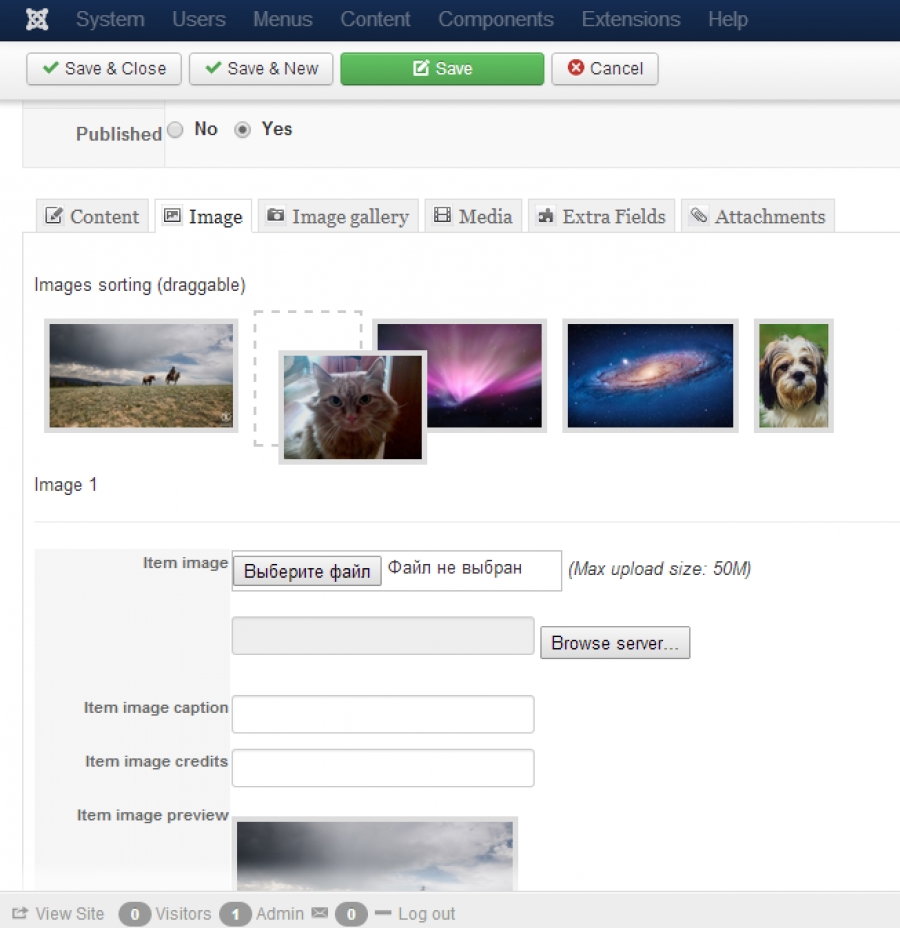
With this plugin you will be able to add multiple images to your K2 Articles with the same way as in standard K2 item add form. It supports multiple images adding from admin panel and also from the frontend.
It is possible to sort your images after upload and upload several images at once. And also with this plugin you will be able to add watermark to images and restrict uploads count from the frontend.
Four different template styles avilable for show the images gallery:
With the plugin purchase, you will get one year free support and updates.
Compatible with Joomla 2.5 / 3.x and the latest K2 version. More
It is possible to sort your images after upload and upload several images at once. And also with this plugin you will be able to add watermark to images and restrict uploads count from the frontend.
Features
- Upload multiple images;
- Order images;
- 4 different template styles for show image gallery;
- Responsive design;
- Watermarks;
- Upload limit from frontend.
Four different template styles avilable for show the images gallery:
- Standard view - shows an images in classic style;
- Slider - image slider without image expand function;
- Slider HS - image slider with image expand function;
- Fotorama - image slider based on Fotorama js library;
- Default - raw style for simply apply your own styles.
With the plugin purchase, you will get one year free support and updates.
Compatible with Joomla 2.5 / 3.x and the latest K2 version. More
YJ K2 Image Slider
14 April 2012
Published in
Extensions
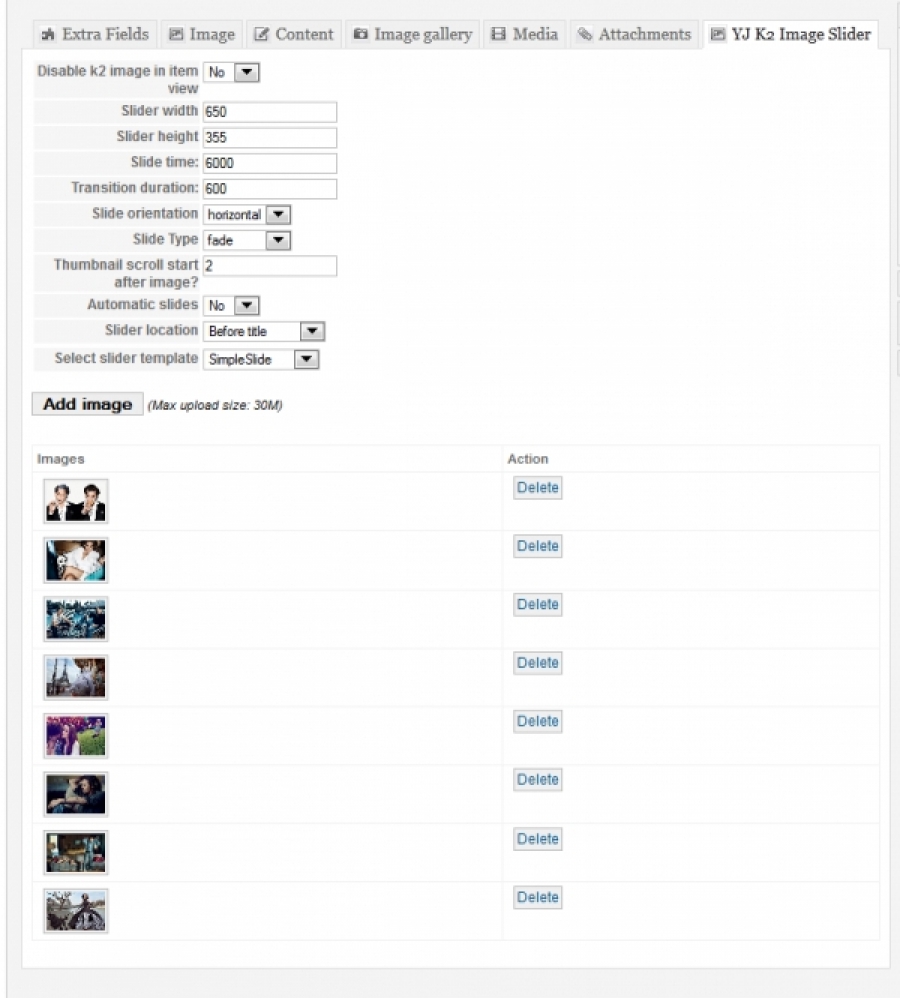
Are you tired of modals and lighboxes? Do you need an actual image slider within your K2 news items? YJ K2 Image Slider is missing Joomla! plugin for K2 that will let you create image gallery from selected images and present them in beautiful Mootools slider.
Built in SimpleSlide plugin template will let you adjust your slider width/height, add unlimited number of images, choose from multiple transitions and more.
The best feature is that the plugin has build in templates option and it will let you create own sliders and templates. This extension is perfect for any web concept or anyone who needs to present more than one image within their news items. More
Built in SimpleSlide plugin template will let you adjust your slider width/height, add unlimited number of images, choose from multiple transitions and more.
The best feature is that the plugin has build in templates option and it will let you create own sliders and templates. This extension is perfect for any web concept or anyone who needs to present more than one image within their news items. More

BT Slideshow Pro
30 March 2012
Published in
Extensions
BT Slideshow Pro is a perfect slideshow module for Joomla. It allows you to easily display images with many flash type animations done in Javascript. You can upload images, get images from different sources as Flickr Album, Joomla Folder, Picasa Album, Phoca Gallery...
More
More